
Author: SEOScanPRO

  • Google September 2026 Spam Update Finishes Rolling Out, Penalties Rise, AI Content And Ads Changes Recapped

    Google September 2026 Spam Update Finishes Rolling Out, Penalties Rise, AI Content And Ads Changes Recapped

    Site owners can now use a fixed September 24 through October 8 window to assess the Google September 2026 spam update. Google confirmed that the worldwide rollout ended on October 8, but the available evidence does not identify what the update targeted or establish that it caused every ranking change reported during the period.

    The update took 13 days and 16 hours to finish, longer than the three earlier spam updates Google ran in 2026. Google calls a spam update a notable improvement to its automated systems for detecting spam, according to its update report.

    What the completed rollout means for site owners

    Google launched the update on September 24, applying it globally and to all languages. The Google Search Status Dashboard recorded completion on October 8 at 1:00 a.m. PDT. The source article describes the rollout as taking nearly the full two-week window Google allowed.

    That gives owners a useful comparison period. Use Google Search Console to compare performance before, during and after the rollout as more data becomes available. A dip during the rollout does not establish that the spam update caused it.

    Early research also requires caution. Diib analyzed 32,569 websites with connected Google Analytics and found that the median share of visits from unpaid Google search fell from 34% to 31% between September 24 and 26. Ten percent of the sites saw that share drop by half or more, compared with 5% in the preceding comparison period. Diib called the findings an early read, not a verdict, and said the data did not reveal which sites Google classified as spam.

    What are manual actions and algorithmic demotions?

    The source article reports a possible increase in Google manual action penalties after the update, but it does not identify the observer or provide an official Google count. Site owners should distinguish that observation from the confirmed completion of the spam update.

    Review any manual action notice in Google Search Console, including the affected URLs and the stated issue, and compare it with Google’s spam policies.

    What to check in your site audit

    A site audit should record evidence that helps distinguish a policy problem from ordinary ranking volatility. The audit does not need to assign a cause to a ranking change. It should show what changed, where it changed and whether the evidence persists across Search Console, indexing data and country-level reporting.

    • Manual action notices: Check Google Search Console for a manual action and record its date, affected URLs, stated issue and the response requested by Google. Escalate the finding if a notice is unresolved or if changes do not resolve the stated problem.
    • Country-level visibility and traffic changes: Compare impressions, clicks, traffic and affected queries before September 24, during the rollout and after October 8. Record whether the change appears across those data sets or only in one report.
    • Indexing and canonical consistency: Review the pages that changed status or visibility, including their index status, canonical selection and whether Google selected the intended URL.
    • Thin or templated pages: Compare the affected pages with the purpose of their sections. Record repeated content, missing information and whether large groups of URLs share the same structure without enough distinct content.
    • Author and credential claims: Check whether named authors, biographies, photos and qualifications are accurate and supported by the visible page. Escalate unsupported claims to the person responsible for editorial or page content.
    • Structured and visible author data: Compare author information in visible page content, metadata and structured data. Record mismatches rather than assuming the search engine will ignore them.

    SEOScanPro provides comprehensive website SEO audits, including a local SEO audit and on-page analysis.

    What publishers using AI content should review

    Google told publishers to manually fact-check AI-generated content for accuracy before publication. The source article also says Google expanded its guidance on how main content is defined and how quality raters review pages. Review the page’s main content and the accuracy of its factual claims.

    Google warned against deceptive authorship information. Compare visible bylines, author photographs and credentials with the supporting records.

    Google also said its spam-update systems use AI to detect AI-generated spam at scale. Review Google’s spam policies and the qualities the source describes for the targeted content.

    How advertisers should assess the product and ad changes

    Google Ads added AI Max columns for brand inclusion, commission tracking and locations of interest optimized targeting. It also introduced self-service conversion-lift management. Automated promotions for Search and Performance Max campaigns are planned, while an AI-powered campaign-localization tool entered beta.

    Google Merchant Center added a UCP integration hub. OpenAI was also testing richer product labels inside ChatGPT results and a visual ad format inside AI image generation.

    Search Console and Search feature changes

    Google Search Console added multi-select country filters to the Performance report. Its Search Generative AI control page also added top-level domain details.

    According to Google, review snippets were removed for healthcare web pages.

    Crawl-management documentation now covers the Retry-After HTTP header, which allows a server to ask crawlers to slow down when it is under heavy load. Google also introduced a UGC fresh-data program.

    Nano Banana 2.1 became available in Google AI Mode. Search profiles expanded to India and Canada, with Brazil coming soon, and Google local panels tested a WhatsApp button.

    What to do now

    1. Create a dated comparison. Compare impressions and clicks in Google Search Console before, during and after the rollout.
    2. Check manual actions directly. Open the manual actions section of Google Search Console. Record any notice, affected URLs and stated issue, then resolve the documented problem before changing unrelated parts of the site.
    3. Review affected content. Look for thin, templated or mass-produced pages that lost visibility. Compare each affected page with its intended main content and Google’s spam policies.
    4. Verify authorship. Confirm that visible bylines, author profiles, photos and credentials match supporting records. Compare structured author information with the visible page and record any mismatch.
    5. Validate AI-assisted pages. Fact-check AI-generated factual claims before publication and revise content that lacks original information or a clear purpose for the reader.

    FAQ

    When did the Google September 2026 spam update finish?

    Google confirmed that the worldwide rollout ended on October 8, 2026. It started on September 24 and took 13 days and 16 hours, according to Google’s ranking update history.

    Did the September 2026 spam update cause every ranking drop during the rollout?

    No. The available early data did not establish causation or identify which sites Google classified as spam. Search Console changes that persist across several days and appear in impressions and clicks carry more evidence than a short fluctuation in a third-party rank chart.

    What should a site owner check after a spam update?

    Check Google Search Console for manual actions, compare performance before and after the rollout, review indexing and canonical consistency, and inspect affected pages for thin or templated content. Also verify author information, credentials and any mismatch between visible and structured authorship data.

    Try the site audit tool
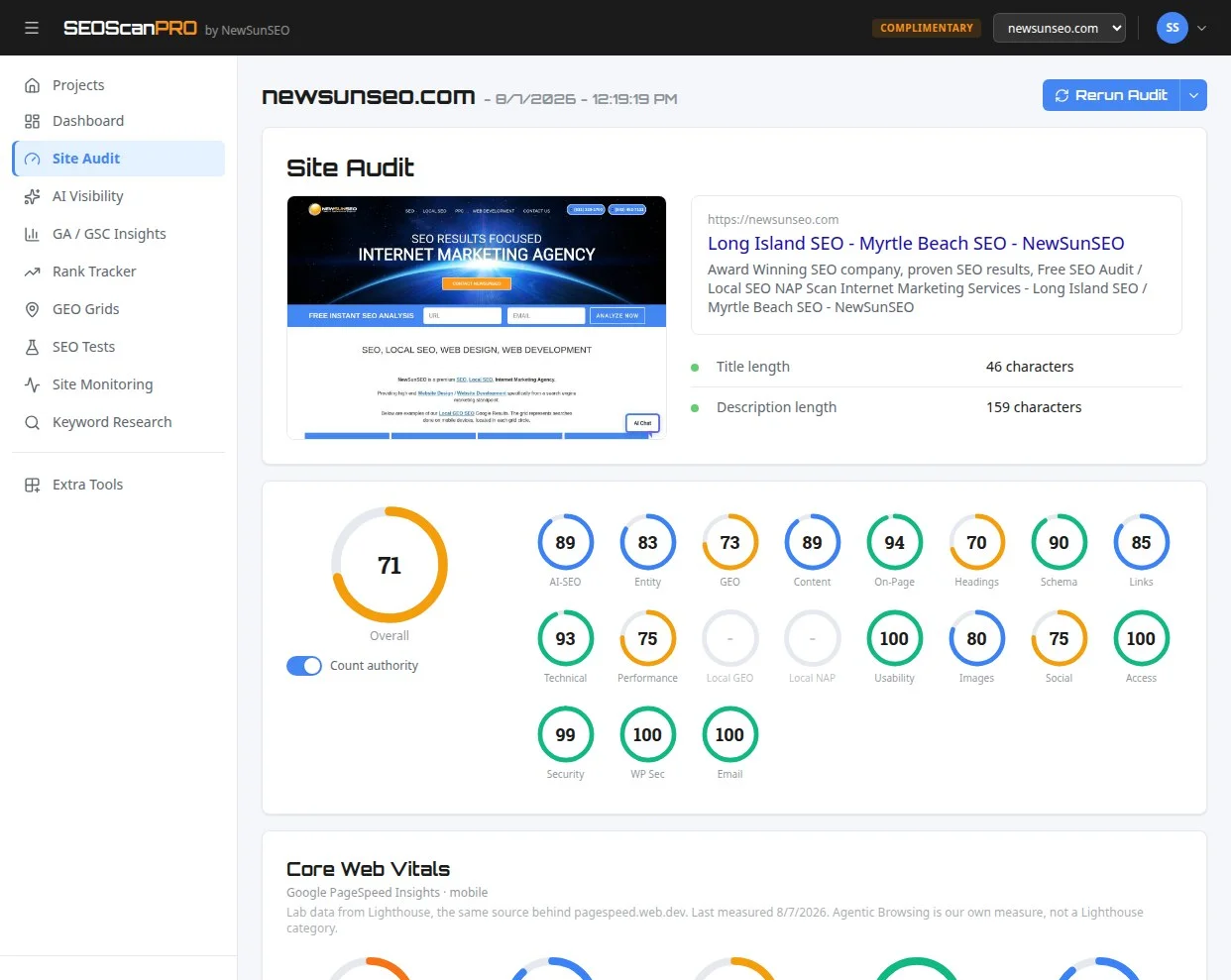
    The SEOScanPro site audit report

    SEOScanPro runs a full technical audit of a site and shows the measured result behind every check. Open the site audit tool.

    This article reports on publicly available information from the sources listed below. We have no reason to believe it is inaccurate, but we have not independently verified every claim, and details may change as the story develops.

    Sources

  • Lunex Stealer Abuses AMD Driver to Disable Security Tools and Steal Browser Credentials

    Lunex Stealer Abuses AMD Driver to Disable Security Tools and Steal Browser Credentials

    Updated October 26, 2026 at 1:12 AM ET

    Ontinue’s analysis of the attack chain found that it begins with a fake CAPTCHA page and that, before the stealer is delivered, the malware is designed to use a legitimate but vulnerable driver to switch off security tools on the victim’s machine, then take browser passwords, session cookies, and cryptocurrency wallet data. Lunex reaches victims through compromised legitimate websites that have had a hidden iframe injected to serve a ClickFix lure. The activity was detailed by security firm Ontinue and targets Ukrainian-speaking users in a four-stage attack chain.

    What happened

    Ontinue documented a campaign that delivers the Psychedelic Stealer, part of a wider malware-as-a-service platform called Lunex, through fake Cloudflare-style CAPTCHA verification pages. According to Ontinue, the chain ends with a fully featured command-and-control agent that extracts credentials from seven Chromium-based browsers, drains cryptocurrency wallets, and keeps persistent remote access through a PowerShell-based native messaging host inside the victim’s browser. The same campaign is described in an official Broadcom protection bulletin, which lists the Symantec signatures that detect it.

    Are you affected?

    More than one group is worth considering here. The first is Windows users who land on a fake CAPTCHA page, which begins a covert MSI installation. The second is owners of legitimate websites, because the operators compromise real sites and inject an iframe that serves the ClickFix lure.

    The abused driver is a kernel-mode driver for AMD Radeon Software, PDFWKRNL.sys, which is vulnerable to CVE-2023-20598. The GitHub Security Advisory Database describes that flaw as a high-severity issue: An improper privilege management in the AMD Radeon™ Graphics driver may allow an authenticated attacker to craft an IOCTL request to gain I/O control over arbitrary hardware ports or physical addresses resulting in a potential arbitrary code execution. Ontinue reported that its validated testing showed "neither HVCI nor the current Microsoft Vulnerable Driver Blocklist prevents the specific PDFWKRNL.sys variant used in this chain from loading, a gap that persists despite the driver hash being catalogued in the LOLDrivers project since March 2026." If you rely on those two controls alone, they do not stop this variant. Website owners can confirm whether their own pages have been tampered with by checking what each page actually serves to a visitor, specifically any iframe that should not be there.

    What to do now

    1. Treat any CAPTCHA page that asks you to copy, paste, or run a command or an installer as hostile, and close it. The infection begins when a fake CAPTCHA delivers a malicious MSI installer.
    2. Keep your operating system and drivers up to date, and follow vendor guidance for vulnerable drivers.
    3. Check Windows for the persistence markers Ontinue listed: a Registry Run key, a hidden scheduled task named "psychedelicloveUtils," and a Chrome native messaging host, plus HTTP traffic to the Lunex panel at 193.178.159[.]128.
    4. If you run a website, audit each page for injected iframe elements and confirm nothing is serving a CAPTCHA-style lure to visitors.
    5. Refer to the Broadcom bulletin, which lists Symantec detection signatures and says "Symantec protects you from this threat."

    How does the Lunex attack chain work?

    Ontinue described a four-stage chain. In its technical report, the firm said "The attack chain begins with a fake CAPTCHA page and culminates in the deployment of a fully-featured C2 agent." A bogus MSI installer, delivered via ClickFix, triggers a loader called LunexLoader. That loader bypasses Windows User Account Control through the CMSTPLUA COM object, uses the bring your own vulnerable driver technique for defense evasion, and then downloads the stealer payload. The use of the BYOVD technique is significant, not least because it is rarely employed as a precursor to a final-stage payload like an information stealer.

    Which AMD driver does Lunex exploit?

    Lunex loads the vulnerable AMD Radeon Software kernel driver PDFWKRNL.sys to escalate privileges and blind security-related processes while keeping them running. The protections look active but cannot see the threat. Ontinue described the method as zeroing kernel callbacks rather than terminating processes, a quieter way to neutralize endpoint detection and response that leaves security products running but blind.

    What does the stealer collect?

    Once active, the stealer communicates with the Lunex panel over HTTP and targets seven Chromium-based browsers: Google Chrome, Microsoft Edge, Brave, Yandex Browser, Opera, Opera GX, and Vivaldi. It takes saved credentials, session cookies, and other browser data. For cryptocurrency theft it enumerates five desktop wallets, Bitcoin Core, Litecoin, Exodus, Atomic Wallet, and Electrum, and four browser extension wallets, MetaMask, MetaMask Legacy, OKX Wallet, and SafePal Wallet.

    How does Lunex stay on the machine?

    The stealer sets up persistence through a Registry Run key, a hidden scheduled task named "psychedelicloveUtils," and a Chrome native messaging host. Ontinue said "The host is backed by a 13,200-byte PowerShell script embedded in the .rdata section that implements the Chrome Native Messaging protocol over standard input and output." The host runs inside Chrome’s process and survives deletion of the stealer binary, system reboots, and browser restarts. The PowerShell script supports six file system actions: listing drive letters C through Z, listing directory contents with file sizes, reading arbitrary files in 512 KB chunks up to 524 MB, writing arbitrary data to any file path, downloading files from the system, and running arbitrary programs. Lunex also injects a malicious Chrome extension by manipulating Chrome Secure Preferences, declaring permissions for cookies, history, bookmarks, tabs, storage, proxy, scripting, declarativeNetRequest, and all HTTP and HTTPS URLs, which gives the extension full visibility into browser activity.

    How widespread is the Lunex platform?

    Lunex is sold to multiple criminal groups. Ontinue explained that "Psychedelic" is the malware file that runs on victim devices, while Lunex is the underlying platform, so Psychedelic Stealer and LunexStealer name the same component. The earliest reference to Lunex in cybersecurity research dates to June 2026, when six active command-and-control panels were identified across the U.S., Finland, Germany, the Netherlands, and Ukraine. Analysis now points to 28 unique panels across 13 countries, with infrastructure hosted in Russia, the U.S., the U.K., the Netherlands, France, Germany, Turkey, and Bangladesh, and signs of Russian-language development. One panel hosted in Turkey resolves to five phishing domains, which indicates the platform’s feature set extends past credential theft into brand impersonation and phishing.

    What this means for your website

    Beyond that, keep your CMS and plugins patched, review file integrity, and remove any element you did not add.

    FAQ

    What is Lunex Stealer?

    Lunex Stealer, also called Psychedelic Stealer, is information-stealing malware sold as part of a malware-as-a-service platform called Lunex. It targets browser credentials, cryptocurrency wallets, and files on Windows systems, and Ontinue reported it currently targets Ukrainian-speaking users.

    How does Lunex disable antivirus software?

    Lunex uses the bring your own vulnerable driver technique, loading the vulnerable AMD Radeon Software kernel driver PDFWKRNL.sys, which is affected by CVE-2023-20598, to zero kernel callbacks. This leaves security products running but unable to see the threat, according to Ontinue.

    Which browsers and wallets does Lunex target?

    It targets seven Chromium-based browsers: Chrome, Edge, Brave, Yandex Browser, Opera, Opera GX, and Vivaldi. It also targets the desktop wallets Bitcoin Core, Litecoin, Exodus, Atomic Wallet, and Electrum, and the extension wallets MetaMask, MetaMask Legacy, OKX Wallet, and SafePal Wallet.

    This article reports on publicly available information from the sources listed below. We have no reason to believe it is inaccurate, but we have not independently verified every claim, and details may change as the story develops. This is not financial, legal or investment advice.

    Sources

  • Google Search AI Mode Rolls Out Gemini 3.8 Flash Globally

    Google Search AI Mode Rolls Out Gemini 3.8 Flash Globally

    Updated October 26, 2026 at 2:12 AM ET

    Site owners often want to understand the models behind Google’s AI answers. Google Search’s AI Mode runs on Gemini 3.8 Flash for Google AI Pro and Ultra subscribers worldwide, and the switch arrived less than three weeks after the previous Flash model reached the same feature. Subscribers select it from the model dropdown menu.

    What Gemini 3.8 Flash adds to AI Mode

    Robby Stein, VP of Product at Google Search, posted on X that "Gemini 3.8 Flash has landed in Search." He described it as "our most intelligent workhorse model yet, delivering significant improvements from 3.7 Flash across software engineering, agentic tasks, and multi-step reasoning," available in AI Mode for Pro and Ultra subscribers around the world. To turn it on, subscribers open AI Mode from a Google Search results page, tap the plus icon in the composer, and pick the model in the dropdown.

    Nick Fox, a head of Google Search, noted on X that the release came "Less than three weeks after 3.7."

    Google reported on its blog that "3.8 Flash also achieves a 54.9% on HLE-Verified, demonstrating its ability to handle multi-step reasoning across STEM, humanities, and professional fields."

    Gemini 3.7 Flash stays available, and Google said it is "looking to bring these capabilities to more people as we can."

    Source links are moving higher in AI answers

    A more recent change affects whether readers ever reach your page from an AI answer. Hema Budaraju, VP of Product Management at Google, wrote on the company blog that Google is "launching updates to show inline links higher up in responses more frequently, helping to ensure key sources are easily clickable right when you need them." Inline links are the links embedded in words or phrases inside an AI response, and a link placed higher is one a reader is more likely to see and click.

    In the same post, Google said the number of people using its Preferred Sources feature has grown by more than 7x since the start of the year. Both signals point the same way: the page Google chooses to cite, and how prominently it links to it, decides how much traffic an AI answer sends back to a site.

    What this means for a site audit

    SEOScanPro runs that kind of technical audit and tracks AI visibility alongside standard rank data, including an AI Agent Readiness check for whether an AI agent can actually read and use a page.

    What to do now

    1. Confirm your key pages return valid, complete structured data.
    2. Check that your robots rules and server responses let Google reach your content.
    3. Make the answer to a likely query clear and near the top of the page.
    4. Track how often your pages appear as cited sources in AI answers, not only your position in the standard results.
    5. Review how your pages read to an automated agent, and fix anything that renders only after heavy scripting or hides core text behind interactions.

    FAQ

    What is Gemini 3.8 Flash?

    Gemini 3.8 Flash is Google’s latest Flash model, described by Robby Stein, VP of Product at Google Search, as its "most intelligent workhorse model yet," with improvements over 3.7 Flash in software engineering, agentic tasks, and multi-step reasoning. Google reported it achieves 54.9% on HLE-Verified.

    Who can use Gemini 3.8 Flash in Google Search AI Mode?

    It is available in Google Search’s AI Mode for Google AI Pro and Ultra subscribers worldwide. Google said it is "looking to bring these capabilities to more people as we can."

    How do I select Gemini 3.8 Flash in AI Mode?

    Open AI Mode from a Google Search results page, tap the plus icon in the composer, and choose the model from the dropdown menu that appears.

    Try the site audit tool

    The SEOScanPro site audit report

    SEOScanPro runs a full technical audit of a site and shows the measured result behind every check. Open the site audit tool.

    Sources

  • Google September 2026 Spam Update Finished Rolling Out

    Google September 2026 Spam Update Finished Rolling Out

    The Google September 2026 Spam Update finished rolling out on October 8, giving site owners a fixed period for comparing search performance before, during and after the release. Google confirmed that the update applied worldwide and to all languages, but did not identify a specific spam policy or disclose the percentage of searches affected.

    The rollout took longer than the previous spam updates in 2026. It ran from September 24 to October 8, while the March, June and August releases took 19 hours and 30 minutes, 2 days and 1 hour, and 2 days and 16 hours, respectively.

    What Google confirmed

    Google’s official spam update documentation and ranking status history contain the details.

    • Launch: September 24, 2026, at around 12:00 pm ET.
    • Completion: October 8, 2026, at 4:37 am ET, or 1:00 a.m. PDT.
    • Rollout duration: 13 days and 16 hours.
    • Scope: Global, covering all regions and languages.
    • Target: Sites that violate Google’s search spam policies.
    • Link spam: The update did not target link spam.
    • Policy changes: Google did not announce changes to its spam policies with this rollout.
    • Impact: Google did not say what percentage of queries or searches were affected.
    • Recovery: Google said a site may take many months to recover as its automated systems learn that the site complies with the spam policies.
    • Refreshes: Google said periodic refreshes to the spam update would follow.

    Google describes a spam update as a notable improvement to its automated systems for detecting search spam. Those systems operate continuously. SpamBrain, Google’s AI-based spam-prevention system, is among the systems Google cites, and improvements can help it identify new forms of spam.

    The documentation says sites that violate the spam policies may rank lower or fail to appear in results. Making changes may help if Google’s automated systems learn over several months that the site complies. For a link spam update, however, removing the effects of spammy links can also remove any ranking benefit those links supplied, and Google says that benefit cannot be regained.

    Google did not say which policy area the September release addressed or why the rollout lasted longer than the earlier 2026 updates.

    What trackers observed

    Third-party tools recorded several periods of ranking volatility during the rollout. The source publication documented three impact windows: September 25 through 27, September 30, and October 4 through 6. Its assumptions depend on no other Google update having run during the same period, which could not be confirmed for the full window.

    AccuRanker, AWR, Wincher and Zutrix registered peak readings during the rollout. SEMRush, Mozcast and other trackers also showed spikes. These readings indicate changes observed by third-party systems, not Google-confirmed losses in search rankings.

    According to Diib, early data from 32,569 websites with connected Google Analytics provided a different view. Diib compared each site’s share of visits from unpaid Google search on September 24 through 26 with the same days one week earlier. According to Diib, the median share decreased from 34% to 31%. Diib described the findings as an early read rather than a verdict and said the data could not identify which sites Google classified as spam.

    Rank trackers can also report changes that people searching on Google do not see. SEOmonitor attributed some of this to incomplete or incorrect results returned by Google during automated searches. Its explanation is not a Google-confirmed measurement of ranking loss.

    A dip during the rollout window therefore does not prove that the spam update caused it. A decline that persists for several days and appears in both Search Console impressions and clicks provides stronger evidence than a short-lived movement on a third-party chart.

    What a site audit should flag

    The September 24 through October 8 window provides a fixed comparison period for an audit. Separate the dates into a baseline period before the rollout, the rollout itself and the period after completion. Then compare Search Console performance, affected queries and landing pages.

    An audit should look for:

    • Crawl and indexing changes: Pages that lost visibility, disappeared from results or changed index status.
    • Traffic and query changes: Declines in clicks, impressions, average position and the share of traffic from unpaid Google search.
    • Scaled content abuse: Pages created mainly for search that offer little original value.
    • Review how search systems may perceive the site or its content.
    • Hacked-content signals: Unexpected files, content or changes on the site.

    Google did not confirm that the September update targeted any one of these policy areas. Treat this checklist as a guide for review rather than a determination of blame for a ranking change.

    For example, an early report about three guides on lilox.io indicated that their combined Google Search impressions may have fallen from 399 across ten days to one. The pages remained indexed and had no manual action. The authors said the affected guides mainly retold other sources without adding their own experience, while 50 older articles gained slightly during the same period. The site owner said the guides were being rewritten with first-hand experience, shortened and returned one at a time.

    The relevant difference was that the affected pages were published on the same day, were longer, contained numerous links and dated references, and lacked material from the authors’ own projects.

    What to do now

    1. Set the comparison dates. Use September 24 through October 8 as the update window. Compare Search Console clicks, impressions, average position, affected queries and landing pages with the periods before and after the rollout.
    2. Check crawl and indexing records. Look for pages that lost visibility, disappeared from results or changed index status during the window. Record which queries and landing pages changed rather than relying on a site-wide traffic total.
    3. Record evidence showing why each finding may or may not apply.
    4. Keep a dated baseline. Save screenshots of affected queries and landing pages, annotate them with ranking and traffic dates, and map each change to a known site or content modification. Document corrective action before requesting reevaluation.
    5. Monitor the recovery window. Google said recovery may take many months and that periodic refreshes would follow. Use a rank tracker with frequent checks to watch individual positions, while treating third-party volatility as context rather than a confirmed ranking loss. SEOScanPro includes a rank tracker that can check positions as often as every five minutes.

    Audit evidence to preserve

    Preserve evidence before changing the site. Save dated screenshots of affected queries and landing pages. Annotate each screenshot with its ranking and traffic dates, then connect it to a known deployment, content change or other site modification. Inspect the relevant spam policy area and record both the finding and the corrective action.

    For manual actions or reindexing, follow the current official process rather than assuming that a request will produce a specific result. Google’s confirmation of the rollout does not confirm a manual action, and the source article did not establish a direct route to recovery for an individual site.

    Known limits

    • Google did not disclose the percentage of queries or searches affected.
    • Google did not identify a specific spam policy or tactic for this rollout.
    • Google did not explain why this update took longer than the earlier 2026 spam updates.
    • Third-party volatility charts do not establish that the update caused every observed ranking change.
    • The early Google Analytics sample did not reveal which sites Google identified as spam.
    • The reported recovery period of many months is not a fixed timeline for every site.

    FAQ

    When did the Google September 2026 spam update finish rolling out?

    The update finished rolling out on October 8, 2026 at 4:37 am ET, or 1:00 a.m. PDT. Google recorded the rollout at 13 days and 16 hours.

    How long did the September 2026 spam update take to roll out?

    It took nearly two weeks, longer than the March, June and August 2026 spam updates, which took 19 hours and 30 minutes, 2 days and 1 hour, and 2 days and 16 hours, respectively.

    What did the Google September 2026 spam update target?

    The update applied globally and to all languages and targeted sites that violated Google’s search spam policies. According to Search Engine Roundtable, the update “does not target link spam” and Google did not mention any changes with the update.

    Try the Search Console analytics view

    SEOScanPro, which includes the Search Console analytics view

    SEOScanPro runs a full technical audit of a site and shows the measured result behind every check. Open the Search Console analytics view.

    This article reports on publicly available information from the sources listed below. We have no reason to believe it is inaccurate, but we have not independently verified every claim, and details may change as the story develops.

    Sources

  • Google Manual Action Penalties Rising: What Site Owners Need to Know

    Google Manual Action Penalties Rising: What Site Owners Need to Know

    Site owners who actively watch their Google Search Console can now spot manual action penalties earlier, which is the upside of a measurable increase in those actions over recent weeks. The most common triggers being reported are thin content, pure spam, and scaled content abuse, many of them landing on long-standing legitimate business sites that had not been flagged before.

    The increase in manual actions falls short of the flood of complaints seen during the pre-Penguin era but exceeds the near-quiet months that followed.

    What is driving the rise in manual actions?

    According to practitioners who specialize in manual action consulting, requests for help jumped from essentially none to several per week over the past few weeks. The consulting work is not being actively advertised, so the increase is being treated as organic demand rather than marketing-driven traffic.

    The categories being flagged most often are:

    • Thin content with little or no added value
    • Pure spam
    • Scaled content abuse

    Many of the affected sites are legitimate, long-standing businesses, indicating the recent wave extends beyond obviously low-quality operators. A practitioner who works on manual action recovery said they have handled a steady flow of cleanup projects tied to earlier use of AI-generated or scaled content.

    What manual actions can Google issue in Search Console?

    A manual action is a human-reviewed penalty applied by Google’s team after automated systems or spam reports flag a pattern. When one is applied, the site owner sees it inside Google Search Console with a specific label and remediation guidance. The recent forum activity shows these labels appearing again across many site categories.

    Common manual action notices include:

    • Back button hijacking, where the site interferes with browser history so visitors cannot return as expected
    • Site abused with third-party spam, where forums, uploads, or free hosting are used to publish spam
    • User-generated spam in comments, forums, or profiles
    • Spammy free host: a hosting service whose pages are largely spam.
    • Structured data issue, where markup violates Google’s guidelines, such as describing hidden or misleading content
    • Unnatural links to your site, a pattern of artificial or manipulative inbound links
    • Unnatural links from your site, a pattern of artificial or manipulative outbound links
    • Thin content with little or no added value, including thin affiliate pages, scraped content, and doorway pages
    • Cloaking and/or sneaky redirects, where Google sees different content than visitors
    • Major spam problems, aggressive spam tactics or repeated policy violations
    • Cloaked images, where images shown to Google differ from what visitors see
    • Hidden text and/or keyword stuffing
    • AMP content mismatch, where AMP pages differ materially from their canonical page
    • Sneaky mobile redirects that send mobile visitors to content Google’s crawlers do not see
    • Site reputation policy violations in third-party content

    How big is the increase really?

    Threads on the Google Webmaster Help Forums show a noticeable rise in manual action complaints. Recent titles include reports of “Thin content with little or no added value” after a 4,000-URL cleanup, “Major spam problems” affecting entire blog sections, pure spam rejections after repeated reconsideration requests, and scaled content abuse notices on legal-industry sites.

    Two AI assistants were asked to scan the forums and chart the trend. Both said yes, more complaints are visible. The two charts did not match, which is a useful reminder that AI-generated trend reads can drift, and forum traffic alone is not a perfect signal of Google’s true enforcement rate.

    The current level is well below the manual action era before Google’s Penguin update, when penalty complaints were a daily staple of SEO discussion. Compared with the near-silent stretch that followed, however, the recent uptick is meaningful.

    What can site owners do now?

    Site owners can act on each flagged category.

    • Audit scaled content. Review any content produced in bulk, especially pages that AI tools helped generate at scale, and check whether each page adds value visitors cannot find elsewhere.
    • Check link profiles. Look at inbound and outbound links for artificial patterns, such as paid placements disclosed only to search engines or exact-match anchors repeated at scale.
    • Review user-generated areas. Forums, comment sections, profile pages, and free hosting subdomains are common entry points for spam that triggers a manual review.
    • Validate structured data. Run pages through Google’s structured data testing tools to confirm markup matches visible content and follows current guidelines.
    • Watch mobile redirects. Confirm that mobile visitors see the same content Google’s crawlers see, with no cloaked landing pages.

    For sites that already show a manual action notice in Search Console, the same actions apply, plus a reconsideration request that documents what was changed and why the site now meets Google’s policies.

    Why this matters for site recovery work

    Some publishers that increased content production are now paying for cleanup work that costs as much as the savings those publishers originally gained.

    For long-standing businesses that were never heavy content producers, the practical gain is awareness: a manual action notice that arrives without warning can drop organic traffic sharply, and spotting it early through Search Console is what protects the rest of the site from compounding losses.

    For businesses that would rather hand the technical checks off, an SEO audit with a tool such as SEOScanPro shows the measured result behind each check, including thin-content and structured-data flags that often precede a manual review.

    FAQ

    Are Google manual action penalties increasing?

    Yes. Practitioners specializing in manual action consulting report that requests for help have risen from essentially none to several per week over recent weeks, and the Google Webmaster Help Forums show more complaint threads than in the previous quiet stretch.

    What are the most common manual actions right now?

    The most frequently cited manual actions in recent reports are thin content with little or no added value, pure spam, and scaled content abuse. Many of the affected sites are described as legitimate, long-standing businesses rather than obvious spam operations.

    How are manual actions different from algorithmic penalties?

    Manual actions are applied after a human reviewer evaluates a site, and they appear as a labeled notice inside Google Search Console with specific remediation guidance. Algorithmic penalties are applied automatically based on signals such as Google’s spam-detection updates, and they do not produce a Search Console notice. Recovery for a manual action requires a reconsideration request that documents the cleanup.

    Try the site audit tool

    The SEOScanPro site audit report

    SEOScanPro runs a full technical audit of a site and shows the measured result behind every check. Open the site audit tool.


  • The Four Types of Keywords in SEO and How to Match Each One

    The Four Types of Keywords in SEO and How to Match Each One

    Every search has a goal: to learn, to find a specific site, to compare options, or to buy or sign up. The four main keyword types in SEO correspond to informational, navigational, commercial, and transactional searches, and looking at which results appear for a query reveals which type is in play.

    What Are the Four Types of Keywords in SEO?

    There are four main types of keywords in SEO:

    • Informational: the searcher wants to learn something.
    • Navigational: the searcher wants to reach a specific website or page.
    • Commercial: the searcher wants to compare options before deciding.
    • Transactional: the searcher is ready to act, such as buying, booking, or signing up.

    These categories describe search intent, the reason someone typed the query and what they hope to get from the results. A keyword can also be grouped in other ways. Local keywords relate to a particular location, branded keywords include a brand name, and long-tail keywords are usually longer, more specific phrases that fewer people search for. A keyword can be local, branded, or long-tail and still fall into one of the four intent types. For example, “sandwich places near me that deliver” is both a local keyword and a transactional one.

    Informational Keywords

    Informational keywords are search queries people use when they want to learn something. Examples include “coffee calories,” “national coffee day,” and “what is the difference between cold brew and iced coffee.” Many informational queries take the form of questions, starting with words like “what,” “why,” or “how.”

    For these searches, Google’s results pages often show articles, videos, or guides. Sometimes Google answers the question right on the page through a featured snippet, a short excerpt from a single web page shown at the top, or an AI Overview, a summary Google generates with AI that links to the pages it draws from.

    A clear page about a specific topic can show the writer knows the subject.

    Navigational Keywords

    Navigational keywords are queries people use when they already know the site or brand they want. Examples include “YouTube,” a brand blog name, and “where is [brand] located.” When someone searches a brand name, the first result is typically that brand’s website, with sitelinks underneath pointing to specific sections of the same site.

    Commercial Keywords

    Commercial keywords are queries people use when they want to compare products, services, or brands. Examples include “best cold brew,” “Dunkin iced coffee flavors,” and “Dunkin cold brew vs Starbucks cold brew.” Searchers with these queries often plan to buy soon. Content such as comparisons, listicles, or reviews can target these searches.

    AI Overviews also appear for commercial searches. A study that analyzed more than 600,000 U.S. desktop keywords across 10 industries reportedly found that the share of commercial-intent results pages with an AI Overview may have grown 71% between November 2025 and April 2026. To reach these searchers, answer the questions they ask while comparing options, including those in the People Also Ask box, a list of related questions Google shows on some results pages.

    Transactional Keywords

    Transactional keywords are queries people use when they are ready to act, whether that means a purchase, a signup, or a booking. Examples include “buy crypto online,” “sandwich places near me that deliver,” and “pickup truck for sale.” These searches, also called buyer keywords, usually occur after a person has finished researching and is ready to purchase. Words like buy, subscribe, or for sale often appear in these queries.

    Transactional searches can trigger Google Shopping Ads, which show product listings with a price and an image. Because these searchers are closest to buying, transactional keywords are valuable for both SEO and pay-per-click campaigns.

    How to Check a Keyword’s Intent

    To check a keyword’s intent, look at three things: the results page, the questions around the query, and any intent label assigned to it.

    • Search the keyword on Google. Notice whether the results mainly show guides, brand websites, comparisons, or pages where people can buy or sign up.
    • Review any AI Overview, People Also Ask questions, and related searches for more clues about what searchers want.
    • Enter the keyword in a keyword overview tool, select the target country, and check its intent label.

    Checking intent this way is especially useful for keywords with more than one possible meaning. For example, in the U.S. the top result for “apple” is the tech company’s website, which would make it navigational. Other keywords, like “coffee beans,” may return both commercial and informational results. This is mixed intent: the same keyword can serve more than one goal, such as learning about coffee beans or comparing options to buy.

    When reviewing an AI Overview, note the questions it answers and the sources it links to. Google notes that AI Overviews and AI Mode may use query fan-out, a technique that runs related searches to help build a response, so the answer may cover related topics beyond the exact words searched. Those related topics show what else searchers tend to want to know, which helps decide what a page should cover.

    How Each Keyword Type Changes What a Page Should Look Like

    How a keyword is phrased hints at its intent, but the search results confirm it. If the top results are product pages where people can buy right away, the keyword is likely transactional. If they are mostly reviews and comparisons, it is likely commercial. Matching the page to the keyword type is what gives a page a fair shot at ranking, regardless of writing quality.

    Optimizing for Informational Keywords

    Create content that answers the searcher’s question clearly and accurately. Start by reviewing the search results for a target keyword and note which questions the ranking pages answer and which formats they use. Then check the People Also Ask questions and any AI Overview for related information readers may need.

    To make the page useful and credible:

    • Answer the main question near the top, then cover the details readers need.
    • Add original examples or firsthand experience where possible.
    • Support factual claims with reliable sources and link to them.
    • Name the author and explain their relevant experience or qualifications.
    • Have a qualified expert review topics that need specialist knowledge.

    These practices reflect what Google calls E-E-A-T: Experience, Expertise, Authoritativeness, and Trustworthiness. Google has said trust matters most, and its systems use a mix of signals to identify content with these qualities. Use descriptive headings so readers can quickly find the part they need. Clear headings and a direct answer at the start of each section also help each passage make sense on its own, which matters when AI systems like Google’s AI Overviews pull from the page to build an answer.

    Optimizing for Navigational Keywords

    Make the brand and key pages easy to find from search by highlighting the brand name on the site, in the homepage’s H1 tag, and across key pages, maintaining clear menus and an updated sitemap, and creating a Google Business Profile to verify the business.

    Optimizing for Commercial Keywords

    Make the product page answer what shoppers want to know while comparing: what makes the product different, who vouches for it, and what else they need before deciding.

    • Lead with the details that set the product apart, like materials, specs, or who it is for.
    • Add third-party proof, such as a review score, award, or certification.
    • Answer the follow-up questions a shopper would otherwise search for, in an FAQ on the same page.

    Google’s AI Mode also helps people compare products by drawing on Google’s Shopping Graph, a database of product listings with details like reviews, prices, color options, and availability. To help products show up there, keep product details complete and up to date in Google Merchant Center, which feeds the Shopping Graph. Check whether roundups and reviews rank for the target commercial keywords. If they do, reach out to the publishers about reviewing or including the product, since shoppers who read these articles are already comparing options.

    Optimizing for Transactional Keywords

    Put the action at the top of the page and remove anything that distracts from it. The first thing a visitor sees should let them complete the task behind the query, whether that is buying, booking, or signing up. Product pages and dedicated landing pages work best for these queries, and pairing them with paid ads against the same terms captures the searchers who are closest to converting.

    FAQ

    What are the four main types of keywords in SEO?

    The four main types are informational, navigational, commercial, and transactional. They describe the searcher’s intent: to learn something, reach a specific site, compare options, or complete an action like buying or signing up.

    How can you tell which type a keyword is?

    Search the keyword on Google and look at what ranks. Top results that are guides and articles usually mean informational intent. A single brand’s website means navigational. Reviews and comparisons point to commercial intent. Product pages and shopping ads point to transactional intent.

    Do keyword types overlap?

    Yes. A keyword can be local, branded, or long-tail and still fall into one of the four intent types, and some keywords serve more than one goal at once, a situation called mixed intent.

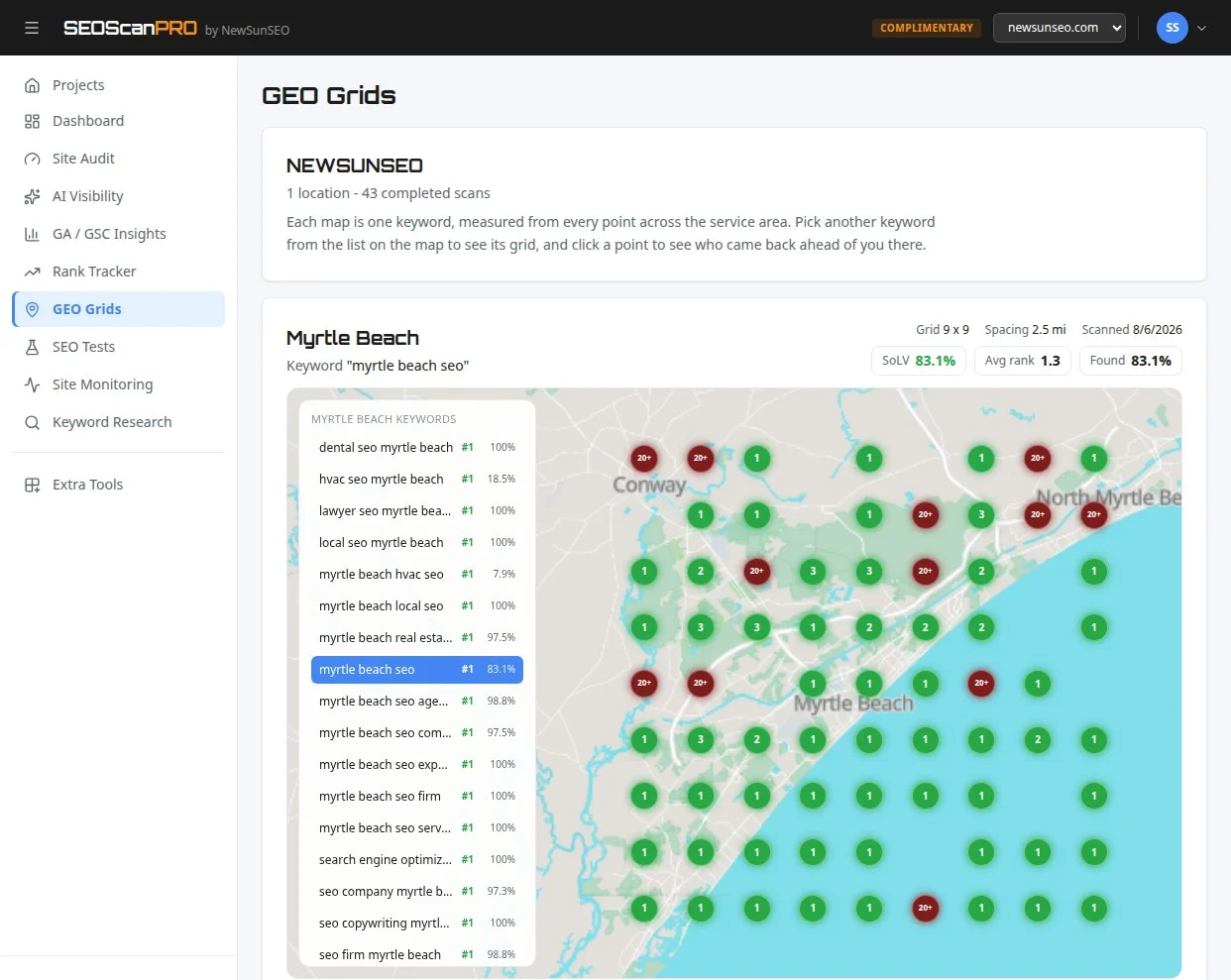
    Try the geo grid tool

    A SEOScanPro geo grid showing local rank by location

    SEOScanPro runs a full technical audit of a site and shows the measured result behind every check. Open the geo grid tool.


  • Google’s UGC Fresh Data Program: How Approved Platforms Can Push Content Faster to Search

    Google’s UGC Fresh Data Program: How Approved Platforms Can Push Content Faster to Search

    Platforms that host user-generated content now have a faster path into Google Search results. The UGC Fresh Data Program is a new initiative from Google that lets approved platforms send content and engagement signals to Google through a dedicated ingestion pipeline, so first-hand discussions can surface in Search without waiting for traditional crawling. Application status responses arrive within 6 to 8 weeks, and Google has stated that not every application will be accepted.

    What is Google’s UGC Fresh Data Program?

    The UGC Fresh Data Program is an initiative designed to help platforms display fresh, high quality, and authentic user-generated content across various features on Search. Through the program, approved platforms can use a dedicated ingestion pipeline to send content and interaction signals to Google. The approach processes fresh posts quickly so Search can surface useful first-hand perspectives from the platform.

    Google has been explicit that the program is separate from the Google Indexing API and from traditional organic crawling for general web content. It is a separate channel built specifically for UGC, and acceptance into the program does not guarantee that any particular piece of content will appear in Search.

    Who is eligible to apply?

    Google’s eligibility criteria cover five areas: content focus, volume and audience, content accessibility, technical readiness, and content health and moderation.

    Content focus

    The platform must primarily host UGC, social postings, or forum discussions. The UGC content should sit on dedicated pages with stable URLs, not on profile or feed pages.

    Volume and audience

    Most small community sites do not get enough traffic to meet Google’s requirements.

    Content accessibility

    Content must live on public web pages that are accessible to Googlebot and to users. Gated content that requires a login or a paywall to view is ineligible. All UGC must be attributable to a creator with a public profile.

    Technical readiness

    The platform owner must be able to implement secure OAuth 2.0 API authentication and construct strictly validated JSON-LD payloads. The platform must already use, or be prepared to implement, valid on-page schema.org structured data markup across its URLs, for example SocialMediaPosting or DiscussionForumPosting with interactionStatistic sub-fields.

    Content health and moderation

    The platform must not publish illegal content and must maintain active content moderation, including a user reporting mechanism.

    How fresh does the content need to be?

    Freshness is built into the program by design. Submitted content should be as fresh as possible, ideally sent within minutes of creation. Platforms must also be able to submit regular updates of engagement counters, within 72 hours of creation, so the signals Google receives reflect the live state of a thread or post.

    Is this the same as the Google Indexing API?

    No. Google has stated that the UGC Fresh Data Program is independent of the Google Indexing API and of traditional organic crawling for general web content. The pipeline is purpose-built for UGC ingestion at scale, and the eligibility bar is higher than what most general web publishers face.

    How to apply and what to expect

    Platforms that meet the criteria can apply through the application page Google has published. Google reviews each submission and will share developer documents with more detail once a platform is accepted. Applicants should hear back within 6 to 8 weeks with a decision, and Google has stated it will not accept every application.

    What Google has not changed

    Approval into the program is not a ranking boost and does not guarantee visibility. Google has written plainly that the program does not guarantee that content will appear in Search. The usual signals, content quality, structured data, and crawlability, still apply. The program is a faster on-ramp, not a shortcut around Google’s standard quality systems.

    FAQ

    What is Google’s UGC Fresh Data Program?

    It is an initiative from Google that lets approved platforms send fresh user-generated content and interaction signals to Search through a dedicated ingestion pipeline, separate from the Google Indexing API and traditional crawling.

    Who can apply for the UGC Fresh Data Program?

    Platforms that primarily host UGC, social postings, or forum discussions on publicly accessible pages with stable URLs, have a high volume of UGC and a significant user base, can implement OAuth 2.0 and JSON-LD, and maintain active content moderation.

    Does the UGC Fresh Data Program guarantee ranking in Google Search?

    No. Google has stated that the program does not guarantee that submitted content will appear in Search. It is a faster ingestion path, not a ranking shortcut.

    Try the site audit tool

    The SEOScanPro site audit report

    SEOScanPro runs a full technical audit of a site and shows the measured result behind every check. Open the site audit tool.


  • Anthropic offers free AI security scans to open-source maintainers

    Anthropic offers free AI security scans to open-source maintainers

    Updated October 26, 2026 at 4:20 AM ET

    The open-source software your website runs on is worth keeping track of. Anthropic has opened OSS Scanner, a free service that runs AI security scans on open-source projects and emails maintainers reports that explain each suspected flaw, how to reproduce it, and, when possible, how to patch it. The findings go to project teams without a human reviewer clearing them first.

    What happened

    Anthropic launched OSS Scanner on October 8, and Help Net Security reported it the day after. The service uses the company’s strongest AI models to look for vulnerabilities in open-source software, then sends findings straight to project teams. It builds on Project Glasswing, Anthropic’s earlier work using Claude to find software flaws. Anthropic’s announcement says human validation had become a bottleneck in its vulnerability research, which is why findings now reach maintainers unreviewed, with the project team responsible for checking each one and deciding what to fix.

    Are you affected?

    If your website depends on open-source software, it is worth paying attention to how those projects are maintained. Anthropic says core maintainers apply through the OSS Scanner GitHub repository, applications are assessed individually, and eligibility is weighted toward established projects important to infrastructure and user security. The company also reserves the right to decide which projects to take on.

    If you run a site rather than maintain an upstream project, it is still worth keeping an eye on the open-source software you depend on. Anthropic reports that OSS Scanner has already helped find multiple issues in curl, including, in the words of curl’s Daniel Stenberg, "one of the worst curl vulnerabilities reported in the last few years." PostgreSQL’s Noah Misch is quoted saying an unusually high fraction of the scanner’s findings uncovered PostgreSQL defects and that "Several reports came with fixes we can use nearly as-is", with fast-track access letting the team address the newest issues before they reached a general-availability release. Keeping the software your site relies on up to date is sensible general practice.

    What to do now

    1. List the open-source components your site runs on, including the web server, encryption and transfer libraries, the database, and the content system.
    2. Watch the security advisory and CVE feeds for each of those projects so you see fixes when they are published.
    3. Keep your software up to date as fixes become available.
    4. If you maintain a core open-source project, consider whether a service like this fits yours.
    5. Projects can pause automated reports, or opt out and return to receiving only reports under Anthropic’s standard disclosure process.

    What early testing showed

    Before the public launch, the penetration testers who review Anthropic’s coordinated disclosure findings checked 97 high and critical severity vulnerabilities from an early version of the scanner across 48 projects. Anthropic says 85 of them, 88 percent, met the bar for its coordinated disclosure process; 11 were real but duplicated known issues or other findings from the scan; and one was a false positive. Separately, Anthropic reports that one project team received 74 reports, and in the words of wolfSSL’s Todd Ouska, "all but two were valid, and five became CVEs".

    Anthropic is explicit about the limits. The company said "We can’t guarantee the scanner will be perfect," and acknowledged reports can overstate severity or misunderstand a project’s security assumptions. OpenSSL Corporation’s Anton Arapov is quoted saying the reports were "as good and sometimes better than what we get from people", particularly when one arrives with a working exploit an engineer can verify on the spot.

    How reports and disclosure work

    Enrolled projects get an initial scan covering the project as it stands, then a bundle of reports by email. Later scans look for vulnerabilities introduced since the last run and issues earlier checks missed, with frequency depending on demand and how widely a project is used. Each report explains the suspected flaw, gives steps to reproduce it, and, where a fix is realistic, suggests a candidate patch. Maintainers can provide guidance on what to test, which inputs to treat as potentially malicious, how to rate severity, and what kind of proposed patches would be useful.

    Because findings are unvalidated when they reach a maintainer, they do not carry a mandatory 90-day disclosure deadline. If Anthropic later validates a report through its existing coordinated disclosure program, a 90-day period can begin when the maintainer is notified. Anthropic says the service suits teams that already keep up with verified high and critical reports and have capacity to investigate more.

    FAQ

    What is Anthropic’s OSS Scanner?

    OSS Scanner is a free service from Anthropic that uses the company’s AI models to find security vulnerabilities in open-source projects. Maintainers who opt in get periodic scans and reports describing the suspected flaw, how to reproduce it, and, when available, how to fix it.

    How accurate are the scanner’s reports?

    Penetration testers reviewed 97 high and critical severity findings from an early version of the scanner across 48 projects. Anthropic says 85, or 88 percent, met its coordinated disclosure criteria, 11 were real but duplicated known issues, and one was invalid. The company also says reports can overstate severity or misunderstand a project’s security assumptions.

    How can a project sign up for OSS Scanner?

    Core maintainers apply through the OSS Scanner GitHub repository. Applications are reviewed individually, with eligibility focused on established projects important to infrastructure and user security. Unvalidated reports do not carry a mandatory 90-day disclosure deadline unless they are later confirmed through Anthropic’s coordinated disclosure program.

    This article reports on publicly available information from the sources listed below. We have no reason to believe it is inaccurate, but we have not independently verified every claim, and details may change as the story develops.

    Sources

  • Anthropic 2026 Usage Policy Update Adds Rules on Deception, Weapons, and Autonomous Hardware

    Anthropic 2026 Usage Policy Update Adds Rules on Deception, Weapons, and Autonomous Hardware

    Anthropic published an updated Usage Policy on October 8, 2026, taking effect November 12, that consolidates rules against deceptive campaigns, sharpens the prohibition on weapon development software, and adds new requirements for AI connected to hardware that takes autonomous physical actions. Most changes clarify existing rules rather than introduce entirely new restrictions, and they reflect the longer, more independent work the company’s models now perform.

    Why the policy is being updated now

    The 2026 revision responds to new patterns of misuse observed over the past year, including influence operations, weapons development, and surveillance of political dissidents. A separate threat intelligence report from Anthropic documented those patterns. The policy was also rewritten to give clearer guidance on high-risk use cases in health, finance, and law, and to address abusive behavior directed at the models themselves.

    A new section on deceptive activity

    Rules against using AI to run networks of fake accounts and fabricated news sites were previously scattered across sections covering elections, fraud, privacy, and disinformation. Those rules are now consolidated under a single heading: Do Not Engage in Deceptive Campaigns or Artificial Activity. The section applies to deceptive activity of any kind, whether political or commercial, and covers efforts to obscure who is behind a message, to amplify content through fake accounts, and to build the tools and infrastructure used to run influence campaigns.

    Sharper rules on elections and democratic processes

    The elections section has been renamed Do Not Undermine Democratic Processes and narrowed to focus on deceiving voters or disrupting elections. Examples covered by the new wording include spreading false information about candidates or voting procedures, impersonating candidates or election officials, and attempting to suppress turnout. A separate blanket prohibition on personalized vote and campaign targeting has been removed, because it had captured legitimate civic work such as nonprofits writing voter information in other languages and election officials sending ballot cure notices. Behavior that originally motivated that rule, including voter targeting based on deception or the misuse of personal data, remains prohibited under the deceptive campaigns, surveillance, and privacy sections.

    Clarified weapons prohibitions

    Use of the models to develop weapons has always been prohibited. The updated language makes clear that this prohibition also covers the software and components that make weapons work, and actions such as arming drones and other autonomous vehicles. According to the update, this language reflects how the rules have already been enforced.

    More precise language on surveillance and law enforcement

    The surveillance and criminal justice section has been rewritten to state more precisely what is prohibited. Tracking people without their consent is now explicitly banned, whether the tracking happens in real time or through analysis of previously collected data. The models cannot be used to decide or recommend who to investigate, arrest, or charge in a law enforcement or criminal justice process, and they cannot be used to build or improve tools designed for surveillance. Permitted uses, also spelled out in the new section, include tracking that people have agreed to (such as fraud monitoring), content moderation, journalism, and legal research.

    Clearer requirements for high-risk use cases

    When the products are used in ways that can affect someone’s health, legal rights, finances, livelihood, or access to essential services, a qualified human in the loop must have the authority to review and, if necessary, change the model’s recommendations, and the affected individual must be told that AI was used. These requirements are unchanged. The High-risk Use Case Requirements section has been rewritten to list more directly which kinds of recommendations are covered and which are not. Following the launch of a Model Hardware Standard, the section also adds requirements for use of the models when they are connected to hardware that takes autonomous physical actions and might be capable of causing injury. A qualified operator must be able to observe the equipment and stop it if needed, and the equipment must be able to hold a safe state if the model is disconnected.

    Abusive behavior toward the models

    The policy adds a prohibition on sustained and needless abusive or cruel behavior toward the models, intended to apply only in extreme cases where users repeatedly act cruelly with no discernible purpose. Common user frustration, pushback, dark creative themes, and model testing or research are not covered. The update aligns with a step already in place that allows the models to end rare conversations with persistently abusive users on the consumer and code products. Ending these interactions will remain the primary enforcement mechanism.

    Clarified Supported Regions Policy

    The Supported Regions page has been updated to clarify how restrictions are enforced. The policy prohibits use of the models by people physically located in an unsupported region, by entities incorporated or headquartered in one, and by entities majority-owned or controlled by persons or entities in those regions.

    Looking ahead

    Further revisions to the Usage Policy are expected as model capabilities and the risks they create continue to change. Input on future updates will be sought from inside the company and from policymakers, subject matter experts, civil society, and product users.

    FAQ

    When does the 2026 Usage Policy take effect?

    The updated Usage Policy takes effect on November 12, 2026.

    What new section was added to the Usage Policy?

    A new section titled Do Not Engage in Deceptive Campaigns or Artificial Activity consolidates previous rules on fake accounts, fabricated news sites, and influence operations, applying them to deceptive activity of any kind, whether political or commercial.

    What hardware safety requirements were introduced?

    When the models are connected to hardware that takes autonomous physical actions and might be capable of causing injury, a qualified operator must be able to observe the equipment and stop it if needed, and the equipment must be able to hold a safe state if the model is disconnected.

  • Google Tests Gemini Phone Call Feature for Pixel Users

    Google Tests Gemini Phone Call Feature for Pixel Users

    Updated October 26, 2026 at 5:50 AM ET

    Google is testing a Gemini phone call feature called Call for Me, which places calls to businesses on a user’s behalf and streams a live transcript the user can interrupt at any point. It is rolling out first to Pixel 11 owners in the U.S. who pay for a Gemini subscription and use the beta version of Google’s Phone app for Android, and Google is treating it as an experiment.

    What Call for Me does on a call

    Gemini can dial a business, introduce itself, work through automated phone menus, wait on hold, and carry the conversation. Google says it can call a store to ask whether a product is in stock, make a restaurant reservation, move a scheduled appointment to a different date, or place items on hold. The call goes out from the user’s own phone number, dialed directly from the device. A live transcript runs on screen so the user can follow the call as it happens and take over at any moment.

    What is new since the first rollout

    Android Authority reported finding early evidence that Call for Me may expand past businesses. Based on "Mom" and "John" examples on the feature’s introductory screen, the publication said this version "would clearly be equipped to handle interactions beyond those with businesses." The same report said it looks like Gemini "will also be giving people the ability to opt out of receiving these calls." Google has not said when, or whether, a version that calls personal contacts will ship.

    What Gemini can share during a call

    Earlier Google calling tools were limited in what they could pass along. With this update, Gemini can share personal details the user approves in advance, which Google says lets it take a broader set of actions.

    Where the experiment is available

    The feature will initially roll out to Pixel 11 owners who pay for a Gemini subscription in the U.S., and it will also require the beta version of Google’s Phone app for Android. Google said it is starting the experiment at a small scale because "real-world conversations are nuanced," and it wants time to get the feature right before releasing it more broadly.

    How it fits Google’s earlier calling work

    Call for Me extends years of AI-assisted calling experiments at Google. The company drew attention to the idea at an I/O developer conference, where Google Assistant was shown calling a salon to make a reservation and adding filler sounds to seem natural. Last year Google released Ask for Me, which let Gemini call businesses to ask about pricing or services. Pixel users have also had Hold for Me and Talk to a Live Rep, which navigate phone trees and wait on hold until a person answers, and Direct My Call, which displays the numbers needed to move through an IVR system. The launch arrives as other AI agents, including Meta’s Muse and Instinct, are also starting to make calls for users.

    What this means for your site’s visibility

    If you run a business, it is worth paying attention to the business information that appears online. A site audit can look at whether your business name, phone number, address, and hours are consistent across your pages and directory listings, whether those details sit in crawlable text rather than inside images, and whether structured data is in place. It is also worth thinking about how an automated agent would experience those same pages. SEOScanPro’s AI Agent Readiness checks whether an AI agent can actually read and use a site.

    What to do now

    1. Confirm the phone number on your site matches your business profile and your directory listings.
    2. Put business hours, address, and contact details in crawlable text, not only inside images or a graphic.
    3. Add or verify LocalBusiness structured data so those details are machine-readable.
    4. Review whether key pages, such as stock, booking, and pricing, are reachable without a login or scripts an automated agent cannot run.

    FAQ

    What is Google’s Call for Me feature?

    Call for Me is a Gemini-powered feature that places phone calls to businesses on a user’s behalf. Gemini introduces itself, navigates automated phone menus, waits on hold, and carries the conversation, while the user watches a live transcript and can take over at any point.

    Who can use Call for Me right now?

    At launch it is available to Pixel 11 owners in the U.S. who pay for a Gemini subscription and use the beta version of Google’s Phone app for Android. Google is running it as an experiment at a small scale.

    What kinds of tasks can Gemini handle on these calls?

    Google says Gemini can call a store to ask whether a product is in stock, make a restaurant reservation, move a scheduled appointment to a different date, or place items on hold, sharing personal details the user has approved in advance. The call is dialed from the user’s own phone number.

    Try the site audit tool

    The SEOScanPro site audit report

    SEOScanPro runs a full technical audit of a site and shows the measured result behind every check. Open the site audit tool.

    Sources

  • Chinese AI agent Artex tied to breach of 68,000 South Korean bank customers

    Chinese AI agent Artex tied to breach of 68,000 South Korean bank customers

    What investigators say happened

    Stolen fields included annual income and personal-loan limits for some affected customers.

    What is Artex?

    Artex is not an AI model itself. It is an open-source agent that draws on existing models, including Claude Opus, ChatGPT, and DeepSeek, to deliver cybersecurity services. It was designed to help organizations find network vulnerabilities, not to enable attacks. The word “agent” matters: a chatbot answers questions, while an agent pursues a goal, chaining together research, planning, and software tools with little human supervision. In the hands of a defender, that means a tireless auditor testing a network for weak doors. In the hands of a thief, it means a lockpick that never sleeps.

    Security professionals have lived with this duality for years. Metasploit, an open-source penetration-testing framework, and Cobalt Strike, a commercial red-team tool, were both built for authorized testers, yet both became staples of criminal intrusion kits. Artex may be walking the same well-worn path, only faster.

    What officials know, and what they do not

    Investigators believe hackers misused Artex to break into the banks and pull customer data, yet public proof remains thin. A server used in the attacks was found carrying an HTML page title with a Chinese-language string associated with Artex, but official channels have offered no details about the perpetrators.

    Artex had drawn attention before this case. After reports of the initial breaches surfaced, its developer updated the user guidelines to prohibit unauthorized intrusions, data theft, and other malicious use. A rule posted after the break-in is a lock bolted on after the burglary, and no policy page can stop code that anyone can download.

    Political and market response

    South Korea’s political response was swift. At a cabinet meeting, President Lee Jae Myung pressed banks to shore up their defenses and called for immediate action. The Financial Services Commission chairman said authorities could not rule out the use of artificial intelligence and called for an “AI attacks defended by AI” approach.

    Part of a wider pattern

    The incident joins a growing string of cases tying AI systems to breaches.

    Criminals have long repurposed penetration-testing and red-team tools. AI agents automate and accelerate the steps an attacker takes to research, plan, and run software actions with little human oversight.

    FAQ

    What is Artex and what does it do?

    Artex is an open-source AI agent built to help organizations find network vulnerabilities. It is not an AI model itself; it draws on existing models, including Claude Opus, ChatGPT, and DeepSeek, to deliver cybersecurity services.

    How many people were affected by the South Korean bank breach?

    Has anyone been identified as responsible for the attacks?

    No culprits have been publicly identified. The intrusions were traced to more than two dozen internet addresses spread across roughly a dozen countries, and South Korean authorities have said they are seeking international cooperation to track them down.

  • Google Ads Will Automatically Pull Promotions From Your Website Starting October 12

    Google Ads Will Automatically Pull Promotions From Your Website Starting October 12

    More relevant offers reach searchers with no extra setup work for advertisers, as Google Ads begins automatically pulling promotions such as coupons and deals from advertiser websites and applying them directly to eligible campaigns starting October 12, 2026.

    The change applies only to Search and Performance Max campaigns that have linked location assets and do not already include promotion assets, and it ships as an opt-out feature rather than an opt-in one, meaning Google will turn it on by default unless advertisers actively disable it.

    What automated promotions actually do

    Automated promotions are designed to lift ad performance by attaching valid, website-sourced deals to ads without requiring manual setup. Google scans a connected website, identifies high-quality offers such as coupons and discounts, and surfaces them as promotion assets inside the campaign.

    Promotion assets are a Google Ads feature that attaches an offer, such as a percentage off, a dollar amount off, or a free shipping line, to a text ad so the deal shows directly underneath the ad copy on the search results page. They are separate from sitelinks, callouts, and structured snippets, and they only appear on campaigns that Google has approved to show them.

    The point of the new automation is to make sure ads reflect live offers on the site, so a searcher who clicks sees a price or deal that still applies rather than a stale one.

    Which campaigns are affected

    All three of the following are required to receive automated promotions.

    • It is a Search campaign or a Performance Max campaign.
    • It has linked location assets attached.
    • It does not already have promotion assets set up manually.

    Display, Shopping, and Discovery-style campaigns are outside the scope of this update, as are any Search or Performance Max campaigns that already use manual promotion assets.

    How to opt out if you do not want it

    Google is automatically opting advertisers in on October 12, 2026. The setting lives at the account level, not the campaign level, so turning it off covers every eligible campaign in the account at once.

    To disable automated promotions:

    1. Open Google Ads and sign in to the relevant account.
    2. Go to the account-level settings for automated assets.
    3. Find the entry labeled Automated Promotions.
    4. Switch the toggle from On to Off.

    Advertisers who want to keep some promotions manual and let Google add others can leave automated promotions on, since manual promotion assets on a campaign already prevent the automation from running on that campaign.

    Why Google is doing this now

    Google has offered automated promotions as a feature for some time. The October 12 announcement is a communications push rather than a product launch, telling advertisers that the feature exists, what it covers, and how to turn it off.

    The underlying goal is ad relevance. An ad that shows a current 20 percent off coupon is more useful to a searcher and more likely to earn a click than an ad that shows nothing or shows an outdated offer. By sourcing them from the website itself, Google removes the manual work of keeping promotion assets in sync with whatever is live on the site.

    What advertisers should check before October 12

    The automation pulls from the advertiser’s own website, so the quality of what ends up in ads depends on what is on the site. A few things worth reviewing:

    • Active promotions on the site, including coupon pages, sale banners, and footer deal links, since Google will read these and decide what counts as a high-quality promotion.
    • Any seasonal or limited-time offers that should not run in ads once they expire on the site.
    • Linked location assets, since the automation only fires on campaigns that have them attached.
    • Existing manual promotion assets, since their presence on a campaign blocks the automation for that specific campaign.

    Advertisers who want full control can opt out at the account level before October 12 and continue managing promotion assets by hand. Advertisers who would rather hand the work to Google can leave the setting on and audit the resulting promotion assets after the rollout to confirm the right offers are being picked up.

    Rank position across a service area is what a geo grid report shows, and SEOScanPro‘s GEO Grids do this.

    FAQ

    When does Google Ads start adding automated promotions?

    Google Ads will start automatically extracting promotions from advertiser websites and applying them to eligible campaigns on October 12, 2026.

    Which campaigns receive automated promotions?

    Only Search and Performance Max campaigns that have linked location assets and do not already include manually set promotion assets are eligible.

    How do I turn off automated promotions in Google Ads?

    Go to account-level automated assets settings, find Automated Promotions, and switch the setting to Off.

  • Google News Tab Showing Content Gaps for Some Publishers

    Google News Tab Showing Content Gaps for Some Publishers

    Freshly published news pages are appearing in Google’s main search results yet going missing from the News tab, leaving publishers unable to explain the gap. The behavior has been observed across large outlets and smaller sites alike, and pages do eventually reappear, though without a consistent timeline.

    What’s happening

    Pages that Google has crawled, indexed, and is serving in the standard web search results are not surfacing in the dedicated News tab at the same time. The missing pages seem to be distributed randomly across publishers of all sizes, and the same URL can appear in the web results, vanish from the News tab, and later reappear without any clear trigger.

    The discovery came from side-by-side testing of web and News tab queries over several days. One example showed a Wall Street Journal article ranking in the all-tab web results while being absent from the News tab for an extended window. The pattern repeated across multiple large and small publishers, including independent blogs covering their own articles.

    What changes through the day

    The gaps are not permanent. Pages that initially appeared in the News tab sometimes dropped out hours later, then returned to the tab after several more hours. One tracked story moved through the full cycle: first visible in both tabs, then absent from the News tab, and finally restored to it by late afternoon.

    The current News-tab gap differs from earlier Google News visibility issues, which had more recognizable patterns such as known indexing delays and topic-level filters. Without a consistent indicator of News-tab presence, publishers cannot confirm in real time whether a story is reaching news-tab readers.

    Why this matters for publishers

    News traffic depends on the News tab, a section separate from the main web results.

    Because the gaps appear random and resolve on their own, there is no consistent step a publisher can take to restore a missing story, and no clear signal that the page itself is at fault.

    What publishers can do right now

    Until Google clarifies the cause, the practical move is to track both tabs separately rather than assume News-tab visibility mirrors web visibility.

    • Check your top stories in both the all-tab web results and the News tab at multiple points through the day.
    • Log the time each story appears or disappears from the News tab to spot a pattern specific to your site.
    • Report clear cases to Google through public and official channels, since anecdotal evidence speeds up recognition of systemic issues.

    Rank position across different result surfaces is what a geo grid measures, and SEOScanPro‘s GEO Grids map visibility across a service area at the page level.

    FAQ

    Why is my article showing in Google search but not in the News tab?

    Multiple publishers have reported pages appearing in the main web search results while being missing from the News tab, with no reliable pattern or trigger. The pages do eventually reappear, sometimes after several hours.

    How long does it take for content to show up in the Google News tab again?

    There is no fixed timeline. Observed cases include stories that returned within hours of disappearing, though the timing varied across publishers and articles.

    Is this a Google News bug or an intentional change?

    The cause has not been confirmed. The behavior differs from earlier Google News visibility and serving problems, which had more identifiable patterns. Google has not yet commented publicly on the current gap.

    Try the geo grid tool

    A SEOScanPro geo grid showing local rank by location

    SEOScanPro runs a full technical audit of a site and shows the measured result behind every check. Open the geo grid tool.


  • Google Business Profiles New Verification Email Asks Owners To Confirm Suggested Edits

    Google Business Profiles New Verification Email Asks Owners To Confirm Suggested Edits

    Google is sending Google Business Profiles owners a new email, titled “Does this look right to you?”, that asks businesses to confirm whether a suggested edit to their listing is accurate within four days. The notification gives owners a direct way to approve or reject updates suggested by other Maps users, which helps keep business information current across Google Search and Maps.

    What the New Google Business Profiles Email Says

    The email shows up in a Google Business Profiles owner’s inbox when a Google Maps user has flagged that some information on the profile might be out of date. A screenshot of the message shared online reads:

    A Google Maps user noticed that some of the information on your Business Profile might be out of date and suggested an update. Please review the suggested update to make sure it’s accurate. There is a suggestion to update the title for this business. Please share your feedback within 4 days by clicking on a link below. Your responses help to keep your Business Profile updates with the most accurate information.

    The message ends with two response options: “Yes, It’s correct” and “No, it’s incorrect.” Clicking either routes the owner through a link to confirm the change inside the Business Profile dashboard.

    Why This Google Business Profiles Verification Email Matters

    Google sends several types of emails to Business Profiles owners to keep listings accurate, and a new phrasing does appear to be in circulation now. The “Does this look right to you?” wording is the fresh piece here, and it is tied directly to user-suggested edits rather than edits Google itself generated. Suggested edits can change the business name, address, hours, category, phone number or other fields that affect how a business shows up in local search. A four-day response window is built in, after which Google will treat the suggestion according to its standard review process if the owner does not respond.

    For local businesses, every confirmed suggested edit can shift how a listing appears in Google Maps and in the local pack results on Google Search. Title changes in particular can affect which queries a profile ranks for, since the business name on a profile is one of the stronger signals Google weighs for relevance. Confirming good suggestions keeps the listing aligned with the business, and rejecting wrong ones keeps spam edits from sticking.

    How To Respond To A Suggested Edit Email

    When a “Does this look right to you?” email arrives, the safe workflow is short:

    • Open the message and read which field is being changed. In the screenshot circulating, it is the business title.
    • Compare the suggested change against the business’s real-world details. If the business recently rebranded, moved, or updated its hours, the suggestion may be valid.
    • Click “Yes, It’s correct” only if the change reflects the real state of the business today.
    • Click “No, it’s incorrect” if the suggestion is wrong, spammy, or refers to a different business.
    • If no action is taken within four days, Google moves the suggestion through its normal review pipeline.

    Owners who manage many locations should treat each email individually, since suggested edits are tied to one specific profile at a time.

    Keeping A Google Business Profile Accurate Between Emails

    More caught issues would reduce how often suggested edit emails arrive and limit the damage a bad edit can cause. Some habits help reduce how often suggested edit emails arrive.

    • Log into the Business Profile dashboard at least monthly to review pending suggestions, not just email alerts.
    • Make sure the business name on the profile matches the legal or brand name used on signage and the website, not a keyword-stuffed variant.
    • Keep hours, address, and phone number identical to what the website and other directories show, so a suggested edit rarely introduces new information.
    • Verify the profile regularly through Google’s own checks when prompted, so the owner remains the primary editor.

    For businesses tracking how their profile reads to AI search engines and to traditional local results, a quick AI scan can show what an AI agent pulls from the listing today. BizScoreAI runs that kind of read on a business profile so owners can see exactly what an AI engine is working with.

    What Triggers A Suggested Edit On Google Maps

    Any signed-in Google Maps user can suggest an edit to almost any business profile. Common triggers include a business that recently changed locations, a new operating schedule after a holiday, a renamed business after a rebrand, or a duplicate profile that needs merging. Spammy suggestions also exist, ranging from keyword stuffed business names to fake address moves meant to redirect customers.

    Google relies on a mix of owner responses, community moderation, and automated checks to decide which suggestions go live. A prompt “yes” or “no” from the owner is one of the stronger signals in that pipeline, which is why these emails carry a short response window.

    FAQ

    What is the new Google Business Profiles “Does this look right to you?” email?

    It is a notification Google sends to Business Profiles owners when a Google Maps user has suggested an edit to the profile. The email asks the owner to confirm whether the suggested update is accurate within four days.

    How long do owners have to respond to a Google Business Profiles suggested edit email?

    The email gives a four-day response window. After that, Google moves the suggestion through its standard review process if the owner has not clicked either “Yes, It’s correct” or “No, it’s incorrect.”

    What kind of changes does the Google Business Profiles suggested edit email cover?

    The circulating example involves a change to the business title. Google can also surface suggested edits for fields such as address, hours, category, and phone number through this style of email.

    BizScoreAI

    BizScoreAI, which includes the free listing check

    BizScoreAI’s free listing check scores how visible a business is to AI search and shows what its listing looks like to the engines people ask. Open the free listing check.

  • Google Local Panel Adds WhatsApp Chat Button to Business Listings

    Google Local Panel Adds WhatsApp Chat Button to Business Listings

    Searchers can now reach a business on WhatsApp straight from the Google local panel, with a new chat button sitting next to the familiar call, directions, website, and share actions. The addition turns the local panel into a quicker way for customers to ask a question, confirm a price, or check stock before they ever visit the store or the website.

    The button appears as part of the local result card that Google shows for businesses in Search, alongside the standard action buttons. Tapping it opens a chat with the business on WhatsApp, giving searchers a direct messaging channel from the results page itself. Google Business Profile already supported WhatsApp numbers, and the local panel is now surfacing that connection as a visible action button.

    How the new WhatsApp button works

    When a business has a WhatsApp number connected to its Google Business Profile, Google can render a WhatsApp button in the local panel for that listing. The button joins the existing row of actions so a searcher can choose the channel that fits the moment: tap to call, tap for directions, open the website, share the listing, or start a WhatsApp conversation.

    For the searcher, the path is simple. A tap on the WhatsApp button opens a chat with the business on WhatsApp, removing the extra step of copying a number, opening the app, and pasting it into a new message. For the business, it means a chat started from Search lands in the same WhatsApp inbox the team already uses, so customer conversations do not fragment across tools.

    How businesses ended up with a WhatsApp number on their listing

    WhatsApp numbers did not appear on Google listings all at once. The rollout happened over several stages, and looking at each stage in order shows why some businesses now have a working button while others do not.

    • Google began prompting businesses to add a WhatsApp number to their Google Business Profile so customers could reach them by chat.
    • More recently, Google started adding WhatsApp numbers on its own for some listings, so a business can pick up a working button without changing anything on its profile.
    • As a result, the WhatsApp button is appearing in the local panel for businesses whether they opted in manually or had the number added by Google.

    Who is seeing the button

    The button was first spotted in the wild, and other searchers have been able to reproduce it, which suggests Google is rolling it out more broadly rather than testing it on a single account. Google has not published a full list of regions, languages, or business categories that are eligible, and the feature is still expanding.

    Because Google is adding the WhatsApp number for some businesses without their input, the appearance of the button is partly a Google-side decision. A business can check whether a WhatsApp number is already attached to its Google Business Profile and add or update it directly if the field is missing or out of date.

    What this means for local search

    Adding a chat button to the local panel is a small change in surface area with a real effect on how customers reach a business. A searcher who is ready to ask a quick question no longer has to leave the results page, dial a number, or load a website. The conversation can start in one tap, which shortens the path between intent and contact.

    For businesses that already staff a WhatsApp inbox, the local panel becomes a new entry point into the same workflow. Conversations that begin in Search show up in WhatsApp next to every other customer chat, so there is no new tool to learn and no extra tab to monitor. For businesses that have not used WhatsApp as a customer channel before, the local panel is a strong prompt to set one up before a competitor answers the customer first.

    Local search visibility has always come down to being easy to contact. A listing that shows five action buttons, including a chat option, gives a searcher one more reason to reach out and one more reason to choose that business over a listing that only offers call and directions. Keeping the WhatsApp number accurate in Google Business Profile is now part of that contact surface, alongside hours, address, and phone.

    What to do next

    Businesses can take a few practical steps now to prepare for the update when it applies to their listing.

    • Open the Google Business Profile and check whether a WhatsApp number is already listed. If Google has added one on its own, confirm it points to the right number.
    • If the field is empty or wrong, add the WhatsApp number that the business actually monitors for customer chats, including the country code.
    • Make sure the team staffing the WhatsApp inbox can answer the kinds of questions a local searcher would ask: opening hours, product availability, booking, and directions.
    • Watch the local panel for the button to appear, since Google is still expanding the rollout and not every listing shows it yet.

    A local listing with a direct chat option can reduce the steps to reach the customer, and a chat starting in Search can convert to a sale without leaving WhatsApp.

    FAQ

    What is the new WhatsApp button in Google Search?

    Google is displaying a WhatsApp button inside the local panel that appears for businesses in Search. It sits alongside the call, directions, website, and share buttons and lets a searcher start a WhatsApp chat with the business directly from the search results.

    How do businesses get a WhatsApp button in the Google local panel?

    A few years ago, Google started prompting businesses to add their WhatsApp numbers to their Google Business Profile. More recently, Google has also added WhatsApp numbers on its own for some listings, which is how the button can appear without action from the business.

    Is the Google local panel WhatsApp button available to everyone?

    The button was first spotted by a search marketer and has been replicated by others, suggesting a wider rollout. Google has not published a full list of regions, languages, or business types that qualify, and availability is still expanding.

    BizScoreAI

    BizScoreAI, which includes the business directory

    BizScoreAI’s business directory scores how visible a business is to AI search and shows what its listing looks like to the engines people ask. Open the business directory.