
Find the Pages Your Site Is Missing, Then Have Them Written
Content Gaps finds the searches your site has no page for, groups them into topics and ranks them. Send a gap to the Content Writer and it researches the search, writes the page and optimizes it for search and AI visibility. The draft waits for you on the Content Writer.
What Content Gaps Does for You
From the searches your site misses to a scored draft, without a spreadsheet in between.
The Searches You Have No Page For
Your Search Console queries, your tracked keywords and Google autocomplete, checked against your own pages. What is left is what your site does not answer yet.
Ranked to Show Where to Start
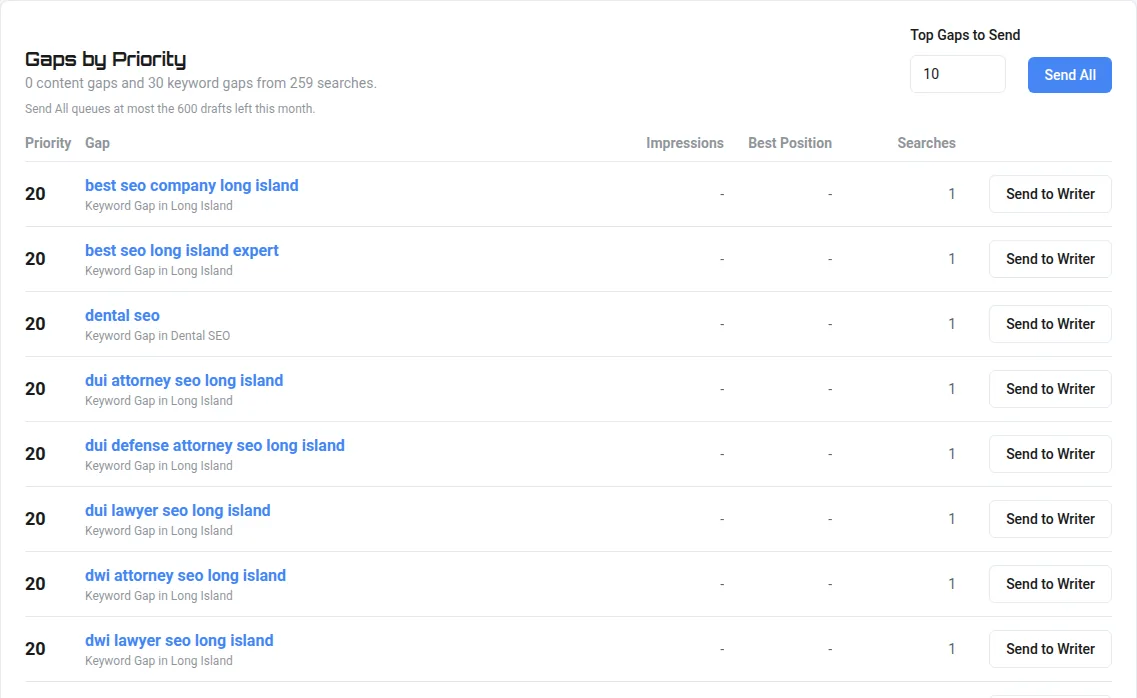
Every gap gets a priority from 0 to 100, built from real impressions, the position you already hold and how many searches the gap covers. The formula is shown on the page.
A Blueprint for Every Page
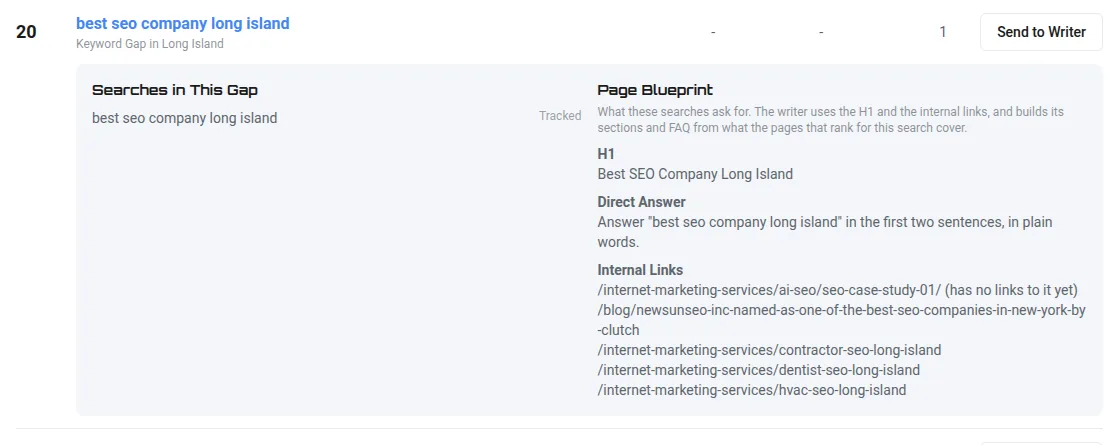
Each gap comes with the H1, a direct answer to lead with, sections built from the real searches, FAQ questions and the internal links to use.
Written and Optimized for You
Send one gap or the top ten. The Content Writer researches each search, writes the draft and optimizes it for SEO and AI Visibility. Nothing is published.
How It Works
Content Gaps finds the searches your site is missing. You send the ones you want to the Content Writer. The writer researches each one, writes it, and optimizes it for search and AI visibility. The finished draft waits for you on the Content Writer.
- Run the analysis for one of your sites
- Read the gaps, ranked by priority, each with its page blueprint
- Send one gap to the writer, or send the top gaps at once
- The writer researches the pages that rank for the search
- It writes the draft, then optimizes it for SEO and AI Visibility
- Open the draft on the Content Writer, edit it and publish when you are ready
Every Search Your Site Should Answer
The analysis reads the searches your site already shows up for in Google Search Console over the last 90 days, when Google is connected. It adds the keywords you track in Rank Tracker, your Prompt-Shaped Queries, and Google autocomplete and question suggestions for your strongest topics.
Each search is checked against your own pages, from your sitemap and the Link Health crawl, by address and title. A search one of your pages already answers counts as covered.
Searches for another company's name are removed, because no page of yours can win them, and so are searches for your own name, which belong to your home page. Every removed search is listed with the reason.
Grouped Into Topics, Ranked by Priority
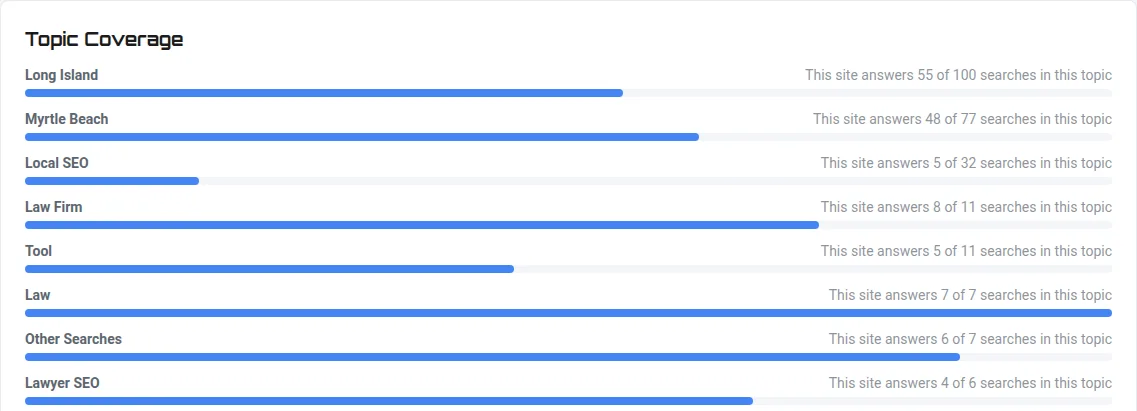
Searches are grouped into topics by the phrases they share. A topic with no page at all is a content gap: a whole page to write. A single search your pages miss inside a topic you already cover is a keyword gap.
Priority runs from 0 to 100. Up to 50 points come from Search Console impressions, up to 30 from the best position you already hold, and up to 20 from how many searches the gap holds. A position from 11 to 20 scores highest, because one good page can lift it onto page one.
Topic Coverage shows, for every topic, how many of its searches your site already answers.
A Blueprint Built From Real Searches
Open any gap to see the searches in it and the page they ask for: the H1, a direct answer for the first two sentences, H2 and H3 sections from the related searches, and FAQ questions marked for FAQPage schema.
Internal links come from your own pages. Pages that nothing on your site links to yet are offered first, so the new page helps the pages around it too.
Send One Gap or the Top Ten
Send to Writer queues one gap. Send All queues the top gaps by priority, ten unless you choose another number, and never more than the documents left on your plan this month.
A search that already has a draft is not written twice. The Writer Queue shows each task as it moves from queued to drafting to draft ready, and a task that has not started can be removed.

Researched Before It Is Written
Before a word is written, the writer reads the pages that rank for the search and lists the subtopics they cover. The draft is written from those subtopics and their key phrases, at about the length the ranking pages run, with the blueprint's H1 and internal links.
Drafts are written one at a time for your account, in priority order.
Optimized for Search and AI Visibility
Each draft is optimized as it is written. It is worked toward its SEO score target, then through AI Visibility passes, and a pass that would lower AI Visibility is thrown out.
Then it goes through the Humanizer and the AI slop check, gets its FAQ and article schema, and is scored for SEO and AI Visibility against the pages that rank. It is also rated against Google's Search Quality Rater Guidelines, and compared with the other pages you wrote for the site. A draft too close to one of them is held back until you change it.
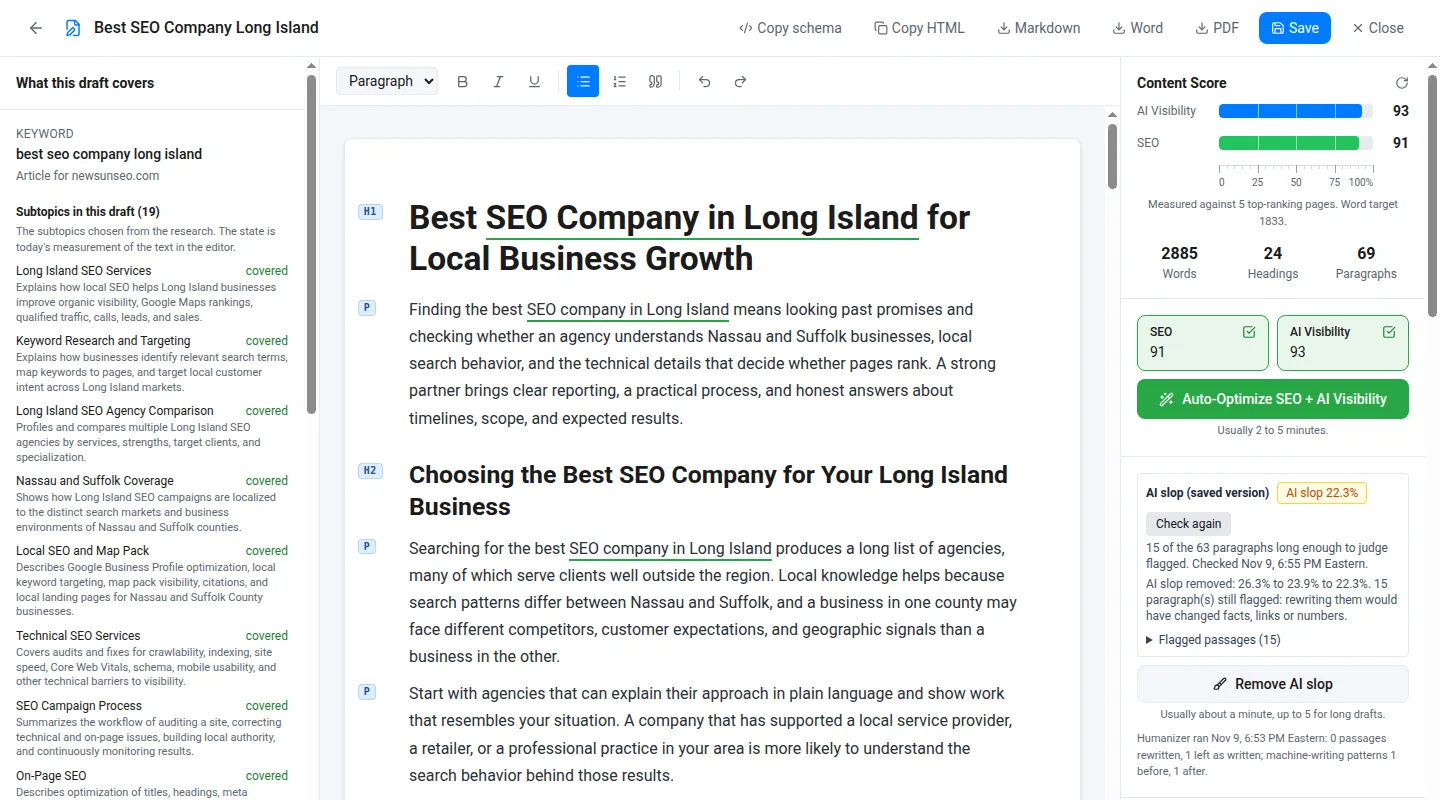
The draft opens in the Content Writer editor with every score and check in front of you, ready to edit, optimize further or export.
Nothing Goes Live by Itself
Every gap you send becomes a draft on the Content Writer. Content Gaps never publishes. You read the draft, change what you want and decide where it goes: send it to your WordPress site as a draft, copy the HTML, or download Markdown, Word or PDF.
On Every Paid Plan
Content Gaps is included on every paid plan and during the 7 day free trial. It is not on the Free plan. Each gap written becomes one Content Writer document, from the same monthly allowance. When the month's documents are used, queued gaps wait and start by themselves on the 1st.
- Starter: 40 documents a month
- Basic: 120 documents a month
- Growth: 360 documents a month
- Pro: 600 documents a month
- Agency: 1,000 documents a month, and each Agency step adds 250
Content Gaps Questions
Does Content Gaps publish anything to my website?
No. Every gap you send becomes a draft on the Content Writer. You decide what to publish and where.
Where do the searches come from?
Your Google Search Console queries when Google is connected, the keywords you track, your Prompt-Shaped Queries, and Google autocomplete and question suggestions for your strongest topics. Each one is checked against the pages already on your site.
Which plans include Content Gaps?
Every paid plan and the 7 day free trial. Each gap written counts as one Content Writer document from your plan. See Plans and Pricing.
The Rest of the Toolset
Find the Pages Your Site Is Missing
Every paid plan starts with a 7 day free trial, which runs at the Growth plan limits, except keyword tracking, which is capped at 50 keywords. No card needed to start.
The full site audit works on any website. Rank tracking, GEO grids, citation audits and AI Visibility results open once you verify the site is yours, a one-time step by DNS record, meta tag, HTML file or Search Console.
Start 7 Day Free Trial